
You talk.I type.

Hold a key, talk, let go. VoiceMochi types your words wherever your cursor is, in every app on your Mac. No “um”s, proper punctuation, in about a second.

Open beta, for Macs with Apple silicon
running macOS Sonoma 14 or later.

  • ~1 sfrom your last word to the text
  • 10 languagesto write in while speaking French
  • Everywhereyou can type text

Three things your keyboard can't do.

Typing by voice is the start. Here's what Mochi does on top.

The app is in French for now, and so are the screenshots below. You can dictate in French or in English.

Translate, reply

Got a message? Answer it in a few words.

Select the text, hold your key and say what you want: “translate”, “tell her that works”, “make it shorter”. If the text can be edited, Mochi replaces it. If it's a message you received, on WhatsApp for example, the result opens in a small window, already copied.
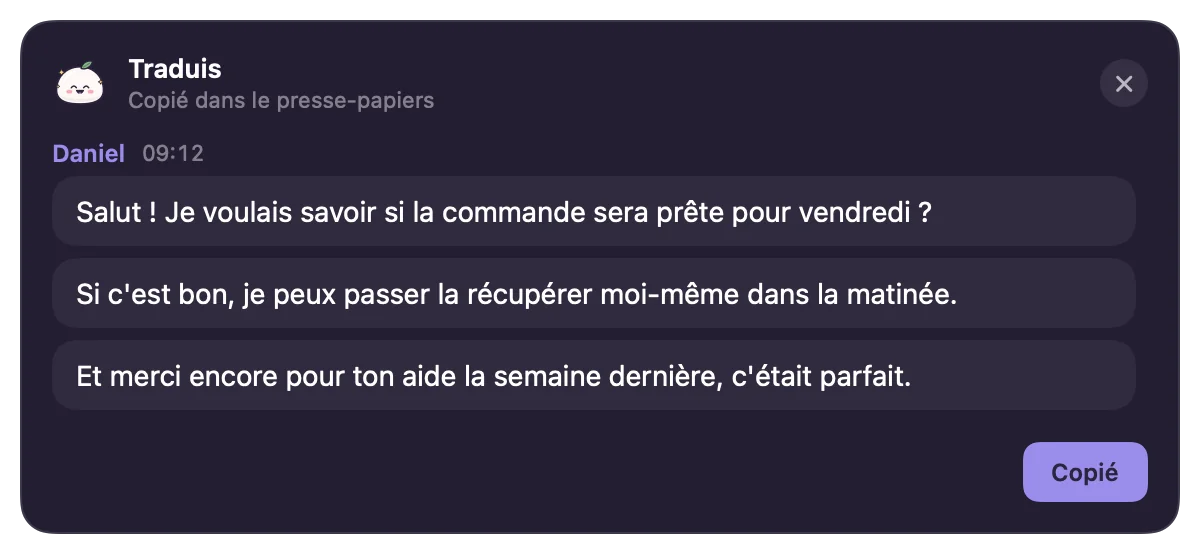

VoiceMochi result window: Daniel's message translated into French, shown as chat bubbles and already copied to the clipboard.Mochi's pill while you give an instruction
Meeting notes

The call ends. Your notes are ready.

Mochi spots the call (Zoom, Meet in your browser, Teams, Discord, WhatsApp, FaceTime, Slack…) and offers to take notes. It records your voice and everyone else's, with no bot joining the call. At the end you get a title, a summary, the decisions, action items to tick off and the full transcript, with search.

Always tell the other people that you're taking notes. Mochi reminds you on every call.

Notes from a Discord meeting in VoiceMochi: summary, decisions, action items and a transcript split between You and Participants.
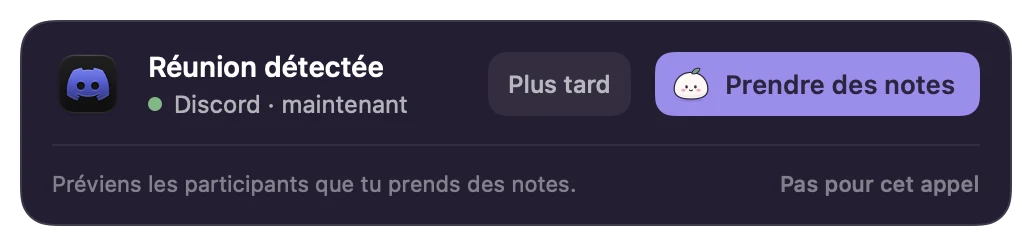
VoiceMochi alert: meeting detected on Discord, with Later and Take notes buttons.
Live translation

You speak French. It comes out in Spanish.

Pick a language in the settings and talk as usual. Mochi writes straight into that language, right where your cursor is.

  • English
  • Spanish
  • German
  • Italian
  • Dutch
  • Polish
  • Finnish
  • Norwegian
  • Swedish
  • French

You say, in French« Salut ! On peut passer la réunion à jeudi après-midi ? »

Dictation written in Spanish in the VoiceMochi history: ¡Hola! ¿Podemos pasar la reunión al jueves por la tarde?

Anything you type, say it.

One tool instead of your keyboard, your translator and your note-taking.

One key, and you're talking.

Hold fn, right ⌥ or any shortcut you like. Talk, let go: the text appears where your cursor blinks, in Mail, Notes, your browser or your chat app. Want your hands free? Click the Mochi pill at the bottom of the screen.

VoiceMochi settings: spoken language, live translation, cleanup, Mochi at the bottom of the screen, whisper mode, meeting notes and the fn or right ⌥ dictation key.

Cleaned up, without the “um”s.

Mochi removes hesitations and repeated words, adds punctuation and gets it when you correct yourself: “Tuesday, no sorry, Thursday” becomes “Thursday”. Every dictation stays in your history, so you can play it back or recover one you cancelled or that went wrong.

VoiceMochi history: today's dictations with the app used, time and word count, including one translated into Spanish and one saved to the notebook.

Your voice, in numbers.

Words dictated, time saved compared with typing (we count about 40 words a minute on a keyboard), speaking speed and your streak of days. Mochi keeps count, you keep talking.

VoiceMochi home: words dictated, time saved compared with typing, speaking speed, day streak, weekly chart and the apps you dictate in most.
  • The notebook

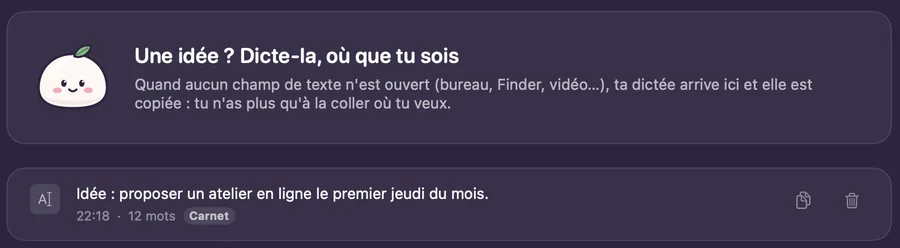
    No text field open? Your idea goes into the notebook, and it's already copied.

    VoiceMochi notebook: a dictated idea saved with its time and word count.
  • Whisper mode

    At the office or late at night, talk very quietly. Mochi boosts your voice so it hears you fine.

    Mochi's pill in whisper mode, labelled Chut (shh)
  • Snippets

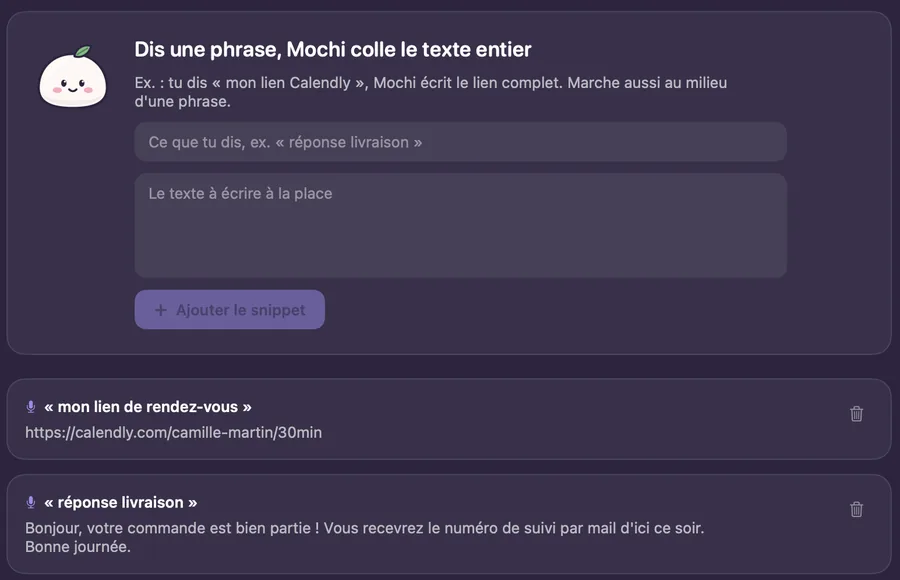
    Say “delivery reply” and Mochi pastes your whole text. Works in the middle of a sentence too.

    VoiceMochi snippets: two spoken phrases replaced by their full text.
  • A style per app

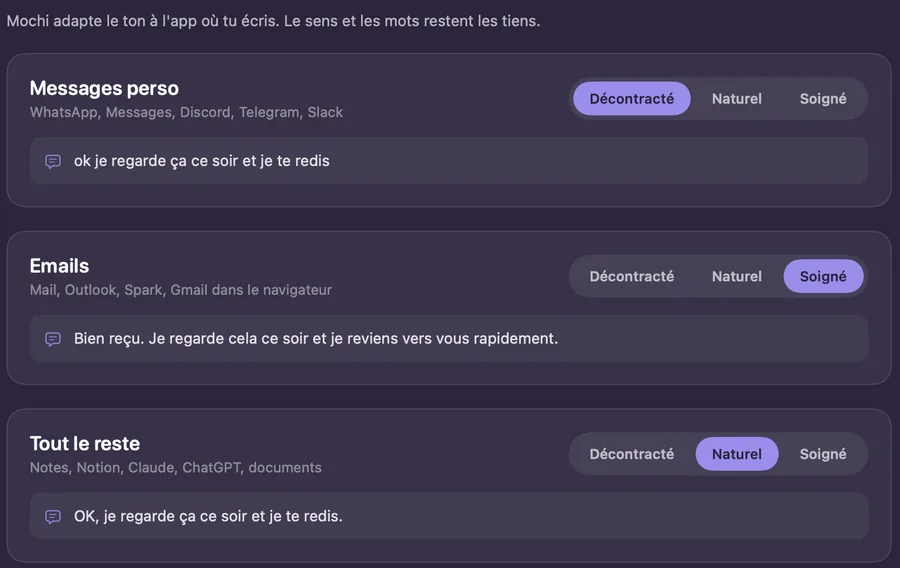
    Casual in your chat apps, polished in your emails. The meaning and the words stay yours.

    VoiceMochi style: casual for personal messages, polished for email, natural for everything else, with an example for each.
  • The dictionary

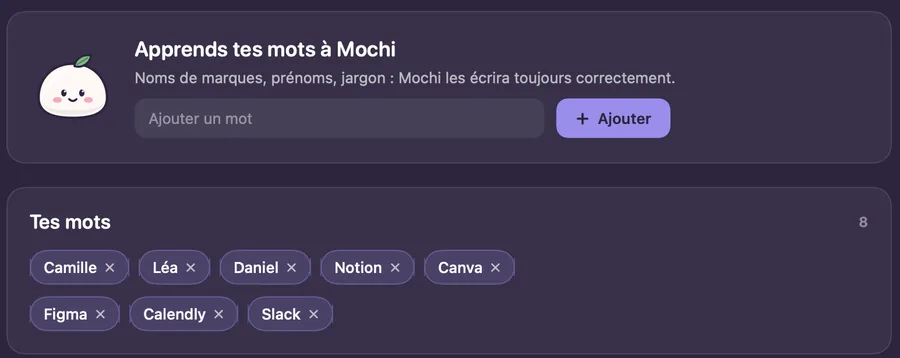
    Names, brands, the jargon of your trade: teach them to Mochi once and it spells them right.

    VoiceMochi dictionary: eight words added, including first names and tool names.
  • Coming soon

    AI command

    A new tab is on its way in the app. We'll tell you about it as soon as it's ready.

Why VoiceMochi

  • One tool. Instead of three.Your keyboard, your translator and your note-taking, in one app.
  • Everywhere. In every app.Mail, Messages, Notion, your browser: wherever your cursor is.
  • Fast. About a second.
  • Cute. And simple.Even if you're new to the Mac.

At the bottom of your screen, I show you what I'm doing. One glance is enough.

  • Listening
  • Typing
  • Done
  • Translating
  • Whispering
  • Noted

For people who write all day long.

  • Freelancers

    Quotes, follow-ups, messages to clients: dictate between two meetings, and the style adjusts to the app you're writing in.

  • E-commerce and customer service

    A customer writes to you in German? Select the message and say “translate”. To answer, say it in French: Mochi writes in their language. Your usual replies fit in a snippet.

  • Teams in meetings

    Nobody has to be the note-taker anymore. Summary, decisions and action items arrive when the call ends, ready to copy.

  • Students

    Revision notes, essay plans, emails to teachers, ideas that show up at the wrong time: talk, read it over, done.

Say it. Mochi types it.

Open beta, for Macs with Apple silicon running macOS Sonoma 14 or later.

Questions

Which permissions does it need?

You grant them yourself in System Settings. Microphone, to hear you. Accessibility, to type into other apps. And Screen & System Audio Recording, only if you want meeting notes: that's what lets Mochi hear the other people on the call.

Where do my dictations go?

To be transcribed and cleaned up, your voice goes through an online transcription service, and the text comes back to your Mac. The same goes for text you transform and for meetings, so you need an internet connection. Your history stays on your Mac: the audio of each dictation is kept there for 7 days so you can play it back, and the text until you delete it. The details are in the privacy policy.

Which languages?

You dictate in French or English, or let Mochi detect the language. With live translation, you speak French and the text comes out in English, Spanish, German, Italian, Dutch, Polish, Finnish, Norwegian or Swedish. The app itself is in French for now.

Will it work on my Mac?

You need a Mac with Apple silicon (M1 or later) running macOS Sonoma 14 or later, a microphone (the Mac's built-in one is fine) and an internet connection. Intel-based Macs are not supported. VoiceMochi types into any app where you can type text.

Can I record a meeting without telling anyone?

No. Always tell the other people that you're taking notes: it's a matter of respect, and in many countries it's the law. Mochi reminds you on every call. No bot joins the meeting; the recording happens on your Mac.

How do I install it?

Download the beta from the Download page. The install steps are shown there, with pictures. You also need a Mochi account: create it from the app or on the website.

Another question? Write to us